

Recording and Equipment Checkout
The primary venues for degree-required recitals, both graduate and undergraduate, are Cook, Hollander and Murray recital halls, and therefore must be set aside for that activity. There are times when a quality recording is necessary for numerous reasons. Scheduled recording sessions are therefore allowed in Cook, Hollander and Murray recital halls for the following purposes:
- Job applications/auditions
- Graduate school applications
- Competitions
- Applications/auditions for summer programs/festivals
- For other purposes, such as CD projects for personal use, classrooms are available in the College of Music, or it may be desirable to investigate the possibility of off-campus sites. A recording contract is not required.
Recording session protocols
- Recording sessions in Cook, Murray and Hollander may only be scheduled 1 week (5 business days) in advance during any available time.
- A maximum of 3 hours in duration for each session.
- A reservation must be made in the patron portal and include the reason for your request.
- Once a reservation has been approved, you will receive an email confirmation and a hold will be placed on your reservation. Included in the email will be a copy of the Recording Contract that must be returned to the main office with your professor’s signature before your scheduled session (Friday at 4:45 pm for all weekend recording sessions).
- Keys will not be checked out until a signed recital contract is received.
- A new Recording Contract must be submitted for each session.
- Only 1 “hold” is allowed in the system at a time.
Following your recording session, please ensure…
- The tech cart (projector) is turned off – the power button is located on the touch pad;
- Tables, chairs, stands, piano are, and other equipment and supplies are returned to their standard location;
- Keyboard instruments are covered and locked (as appropriate);
- AV Rack (Cook) powered down and locked;
- All lights are turned off.
The College of Music has secured Zoom cameras using a micro SD card, adapter, and tripod for students and faculty to check out for self-recording needs.
- The cameras are available on a first-come first-served basis and must be reserved using the patron portal.
- The cameras require a micro SD card which are NOT included with the camera.
- SD cards are available at many locations including Target and Best Buy.
- There is no charge for students and faculty to use the cameras, but the person signing out the camera is responsible for any damage or missing items upon return.
- Cameras must be returned by the due date or will be subject to a late fee.
Contact the College of Music Main Office for more information, 102 Music Building or 517-353-5340.
Zoom Q8n-4K Video Recorder
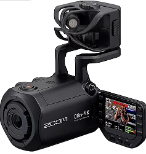
Recommended Record Settings
• MODE – Mov + wav
• RES – 4K (1080 saves you more than double the space, 720 is not recommended)
• FPS – 4K (recommend 30) for 1080 (recommend 60 good capturing fast/dynamic movement)
• BRIGHT – Low
• SCENE – Indoor or auto
• FOV – Wide
How to format micro-SD card
• Press the bottom right button on the screen to bring up the Settings Screen
• Press SD card
• Press SD format
Audio
• Press the channel button(s) of the audio channels you want to record
• Mic = the on-board stereo mic (adjust level via wheel on top of mics)
• Ch 1 & Ch 2 = external mics you add
Other Details
• You need a micro–SD Card.
• You can download the Zoom Q8n Control App for your phone. Details here.
• Want to use it as a webcam? No problem! Tutorials are available online.
• If you need more info, there are many resources and manuals available.
Instructions/link for checking out cameras
• Camera use is tied to a room reservation. Reserve a room, then reserve a camera. All available via webcheckout.
• Reserve at least two weeks in advance. These items are first-come-first-served, so reserve as early as possible.
• Check calendar for availability here!
Miss the training and/or want a refresher?
• Learn how to set up and use the tripod.
• Learn how to set up and use the Zoom Q8n-4K camera.
The College of Music recommends that students and faculty check out a hard drive to use with the recording equipment in Cook, Hollander, and Murray.
External hard drives are available for checkout in the Main Office at no charge.
Contact the College of Music Main Office for more information, 102 Music Building or 517-353-5340.
- Special requests for multiple pianos, harpsichord or organ must be made at least 10 business days in advance. Refer to details on the Student Recital Scheduling Contract and in the Piano Use Policy.
- Students and Faculty may hire an outside contractor to audio and/or video record events.
- Students are responsible for their own stage set-up, lighting, stage crew, and ushers.
- NOTE: All graduate recitals must be recorded.